
Combine digital and analog strip with single controller
- Why combine digital and analog strip?
- What outputs can I utilize?
- What gear are you using in your video?
- Mapping
- What effects can I use when I combine digital and analog strip ?
- What controllers can I use to combine digital and analog strip?
- How many devices can I connect to single output?
- How can I trigger the effects?
Why combine digital and analog strip? #
Since you can combine digital and analog strip, you can have a single device that will do the job of multiple controllers.
What outputs can I utilize? #
The software will automatically output the signal for the dimmer to the front XLR port. Once you searched for your controller in the LED Strip Studio sofware, you can assign both types of pixels to the dedicated outputs.
As answered in a previous blog, you can change any number of outputs on either SPI Matrix or LED Ethernet Controller 3 to DMX. This give you great versatility for your project, since you can combine digital and analog strip. If you are working with more then one output, check out the blog so that you find out details on how to change the SPI output to DMX.
What gear are you using in your video? #
LED Ethernet Controller 3, LED Strip Studio software. Then our own 4CH RGBW Lady Dimmer. After that a pretty old school DMX console and a random dimmer that we found in the storage (black box). Naturally, a bunch of 12V digital pixels and a analog strip.
Mapping #
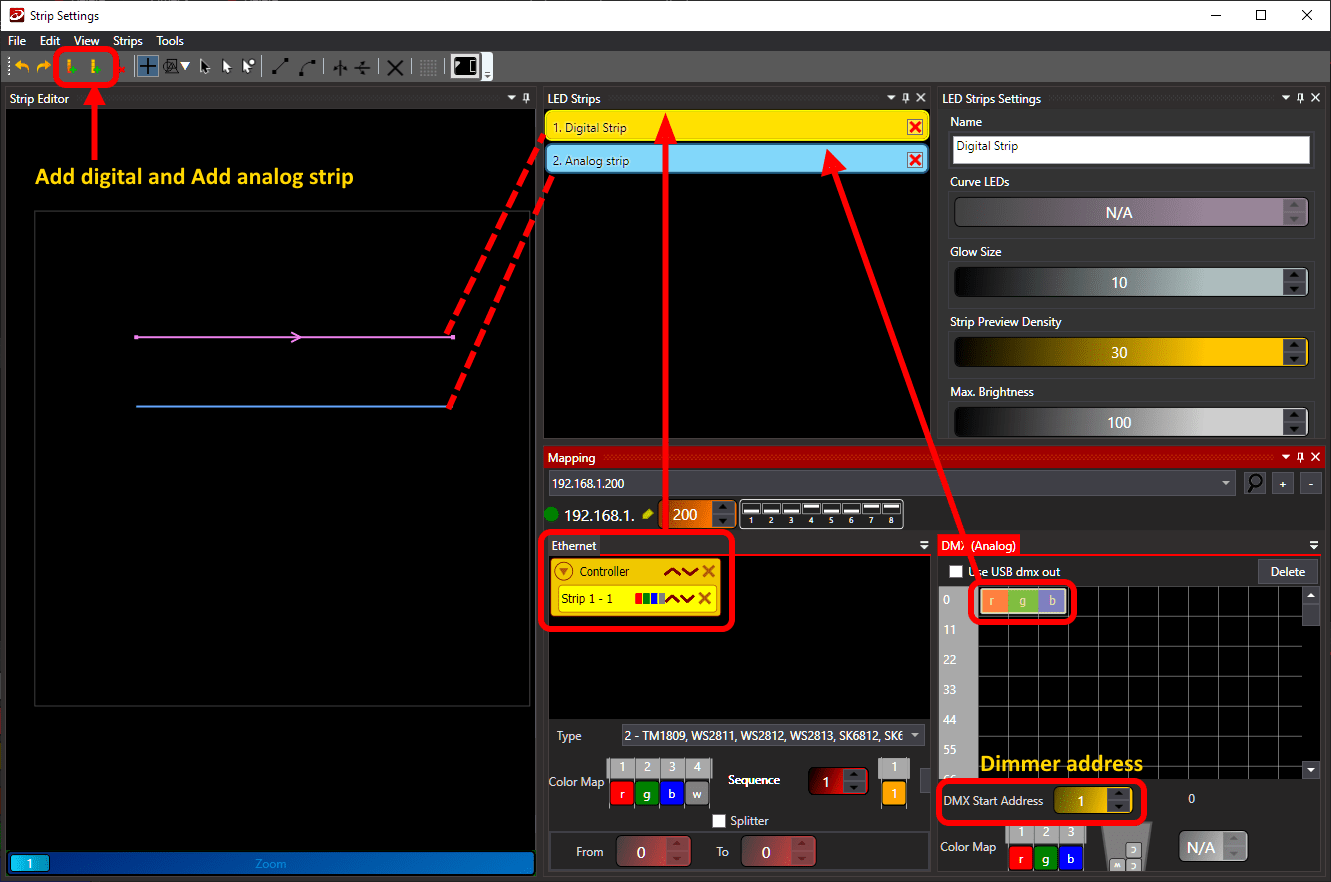
For the example used here, you need to create a separate mapping for your digital and analog strip. In the software, you draw two lines, one using Add digital strip and one using Add analog strip. You assign the digital strip to your controller by drag and drop in to the Ethernet area. You then do the same with the analog strip, however you do that into the DMX (Analog area).
On the dimmer, you set up the DMX address of the device using DIP switch. Set this number as a starting DMX address in the software. And you are done ! If you need more then one output, check out the link for the blog where we are talking about how to change the SPI output to DMX.
What effects can I use when I combine digital and analog strip ? #
In the example shown in the video, the effects applied to both digital and analog strip is the same. However, due to the fact that you can not control each individual pixels with your Analog strip, it is “just” flashing. However, this is mighty useful when you want to achieve the same look across your decorations. You simply select the effect that you like and apply it to both types.
This will work with specific type of effect – you need to select the Color effect. Standard digital strip effect wont work as intended. You can only apply the Analog Tron Dance from the library only.
What controllers can I use to combine digital and analog strip? #
Both SPI Matrix and LED Ethernet controller 3 can change the strip type of the SPI output to DMX, and you can do the same with SPI LED Controller. However! with the small DIN rail mount device, you can use only one protocol at the time. With the aforementioned controllers, you have a single XLR DMX out and you can always repurpose the SPI output.
How many devices can I connect to single output? #
We mentioned this a couple of times. A standard for DMX is 32 devices in a daisy-chain. Combine that with 1024 digital pixels on a single output and you have your heavy duty workhorse for any kind of project.
How can I trigger the effects? #
Good point! Obviously, you can use the two buttons as shown in the video. An easy solution, mainly for testing. A more convenient way is to use the PC and the software. Although most of the times, you don’t want to have the PC running at all times. Thus, you can use DMX to trigger the effects. You can either find a console, DMX TRX board where you can hook up to 8 buttons, or any other DMX signal source.


