Documentation

Help Right Where
You Need It.

The LSS4 manual is split into logical sections that match how the software is organized. Every window has a ? icon — click it and the manual opens to the exact section covering what you're looking at right now. No searching required.

Click ? — land on exactly the right page

Every major window in LSS4 — the mapping workspace, the video scene editor, the show timeline, the phase editor, the SD card export — has a small ? button. Clicking it opens the online manual and navigates directly to the section describing that specific window or feature. You never have to know what the section is called or search through a table of contents to find it.

This context-based approach means the manual is most useful at the exact moments when you're trying something for the first time. You get help in context, not after you've already left the screen that confused you.

  • Every window has a ? icon linking to its manual section
  • Manual opens directly to the relevant page — no searching
  • Available from every editor: mapping, video, timeline, effects, SD card
  • Consistent with the software's own organizational structure
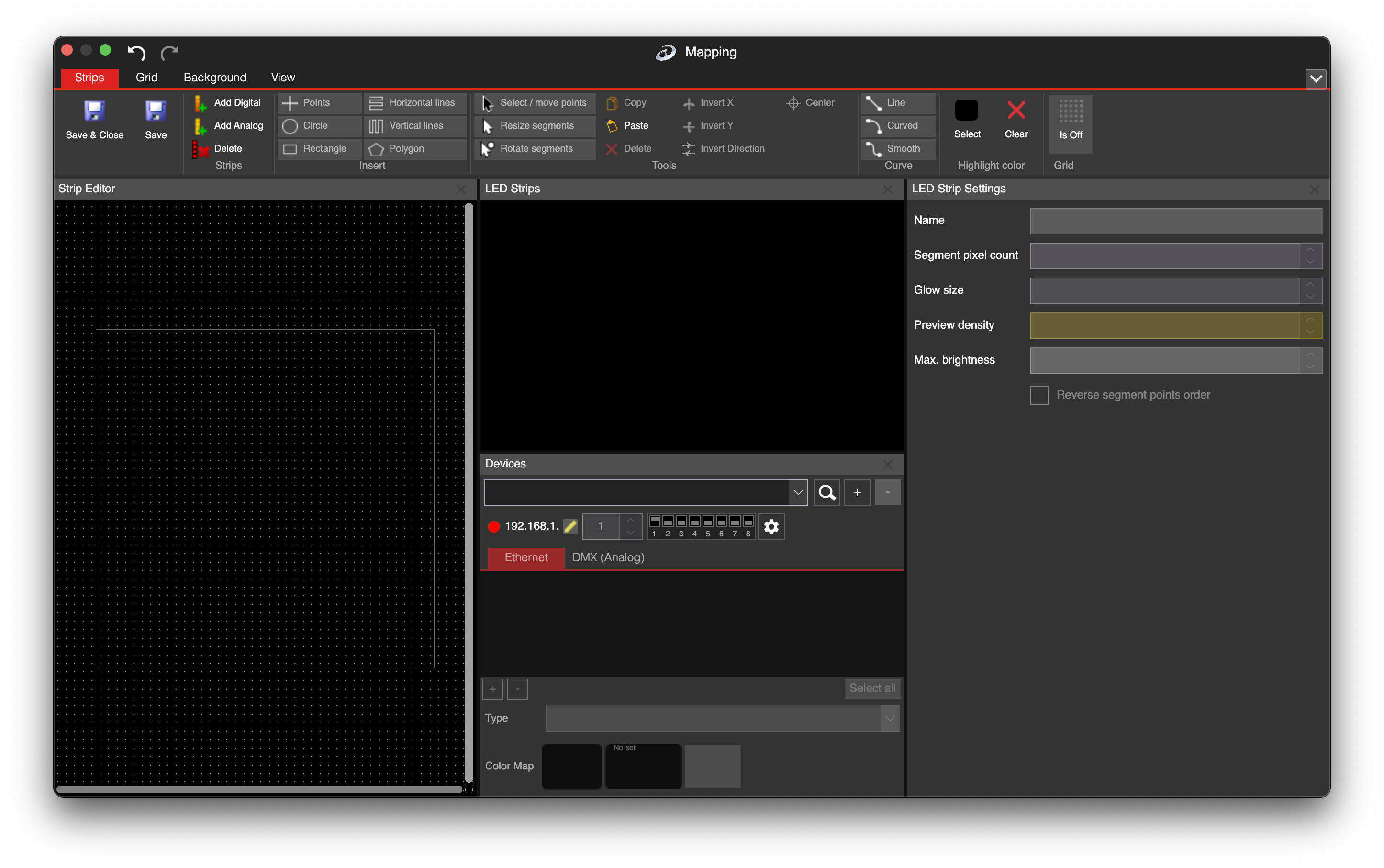
LSS4 mapping window with context help button

Organized the way you actually work

The manual is divided to mirror the workflow in LSS4: getting started, hardware setup, mapping, video and effects, the show timeline, and export. If you're setting up a new LEC3 controller, you go to the hardware section. If you're building an animation in the timeline, you go to the show section. It follows the natural sequence of a real project — not the internal architecture of the software.

Each section includes step-by-step instructions with annotated screenshots, so you can follow along without guessing what a button does or what the expected result looks like.

  • Sections organized by workflow stage, not software module
  • Step-by-step instructions with annotated screenshots
  • Covers hardware setup through show export
  • Getting started guide for first-time users
  • Separate sections for advanced features: phase editor, SD card, MIDI MTC

LSS4 getting started section of the manual

What's covered

🚀

Getting Started

Installation, hardware connection, workspace setup, and your first LED layout from scratch.

🗺️

Mapping

Segment drawing, grid creation, visualization setup, and full pixel-to-canvas mapping workflows.

🎬

Content & Effects

Video scenes, image layers, color effects, screen grabber, strip scenes, and animation keyframes.

🎭

Shows & Export

Music timeline, phase editor, transparency editor, unlimited tracks, SD card export, and MIDI MTC.

Manual questions

Where can I find the LSS4 manual?

The LSS4 manual is available online and is accessible directly from within the software. Every window in LSS4 has a ? icon — clicking it opens the manual to the exact section for that window. You can also access the manual from the Help menu inside the software.

Is there a quick start guide for new LSS4 users?

Yes. The Getting Started section of the manual walks you through installation, connecting your first LEC3 or Reactivo 2 device, creating a mapping workspace, and running your first animation. It's designed to get you from install to working output in one session. If you prefer human help, the support team is also available for setup calls.

Does the manual cover advanced features like the phase editor and MIDI MTC?

Yes. The manual has dedicated sections for every advanced feature including the phase editor, transparency/alpha editor, MIDI MTC synchronization, SD card export, touch mode, and IC chip configuration. Each section follows the same step-by-step format with annotated screenshots.

Where can I get the manual?

The manual is installed along the LED Strip Studio 4 software, but you can also find it online.

Contact & Support

Real people, real answers. Choose the channel that works best for you.

📧

Email

Send us your questions, project details, or feature requests. We reply with thorough answers.

[email protected]
💬

WhatsApp

Quick questions, photos of your installation, or a live voice call — WhatsApp works for all of it.

+421 948 280 393
📹

Zoom Consultation

Book a screen-share session with the team. Walk through your project, get hands-on guidance.

Book a Call
🎧

Talk to Support

Use the contact form to describe your issue or question in detail. We follow up promptly.

Contact Us
✈️

On-Site Support

For large-scale installations — stadiums, studios, architecture — we travel worldwide to assist on-site.

[email protected]
⬇️

Download Free Trial

Try LSS4 with full features. No credit card required. Windows and macOS.

Download Now

Documentation that gets out of your way

Click ? anywhere in LSS4 and land on exactly the right manual section. Download and explore.