Installations
How Does Pixel LED Showroom Lighting Work in Practice?
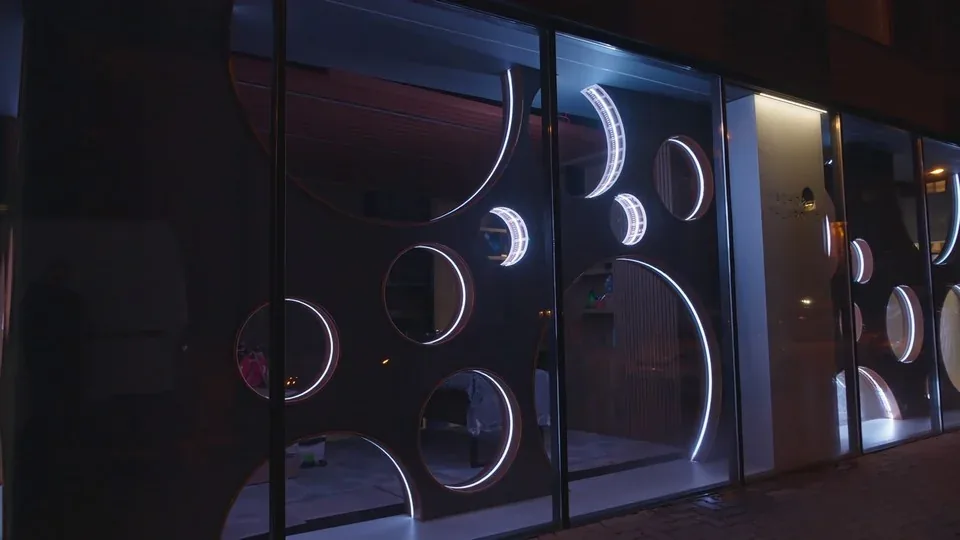
A showroom rarely needs more light. It needs light that makes people stop walking. Pixel LED showroom lighting does exactly that, because it turns an architectural detail into slow, controlled movement instead of a fixed glow.
This article walks through a real installation for Macho & Chlapovic, an appraisal house, numismatic showroom and auction centre. It is written for integrators, shopfitters and business owners who want to know what such a build requires in hardware, signal planning and software work.
What Is Pixel LED Showroom Lighting?
Pixel LED showroom lighting is an installation in which every LED, or every small group of LEDs, is addressed individually. The light then changes as content, not as a dimmer setting. One physical build delivers many different looks without any rewiring.
That property is what makes it suitable for retail and for representative premises. A gradient can travel across a whole facade. A colour can shift over minutes instead of seconds, and the entire scene can be swapped from a phone for a specific occasion.
The risk is equally obvious. Addressable pixels are easy to overdrive, and a showroom that flashes like a nightclub loses the credibility it was trying to build. In premises of this kind the brief is ambience first, effect second.
Which Hardware Does a Coin Facade Need?
The inner facade of the showroom carries circular openings, each one a stylised coin. Every opening is fitted with a WS2815 addressable pixel LED strip at 60 pixels per metre, running at 12 V.
We use 12 V strips in our own projects as a default. Compared with 5 V, the same run tolerates a longer distance before voltage drop starts shifting colour at the far end. That matters when a fixture sits inside a facade and is hard to reach later.
| Parameter | Value in this installation |
|---|---|
| LED strip | WS2815 addressable pixel LED strip |
| Pixel density | 60 pixels per metre |
| Strip voltage | 12 V |
| Fixture per opening | one strip ring per circular “coin” |
| Signal distribution | SPI Lamp output multiplier / signal splitter |
| Cable to each ring | standard CAT6 Ethernet |
| Controller | LEC 3 or SPI Matrix |
| Software | LED Strip Studio 4 |
| Daily control | LSS Remote app over the in-house network |
How Does the SPI Lamp Distribute Signal Over CAT6?
The facade construction left no room to mount controllers near the circles, which is the normal situation in a finished interior. Signal to each coin is therefore distributed through the SPI Lamp, our output multiplier and signal splitter accessory.
Each lamp sits at the fixture and receives data over a standard CAT6 Ethernet cable. The pixel LED controller is placed wherever there was space. Strips are never chained to one another, so the signal path follows the building rather than the decoration.
Using Ethernet cable also removes a cost line from the budget. CAT6 is standardised, cheap and available anywhere, and it can be pulled by the electrician who is already on site. Shops and trade show stands face the same distribution question, covered in our guide to pixel LED lighting for commercial spaces.
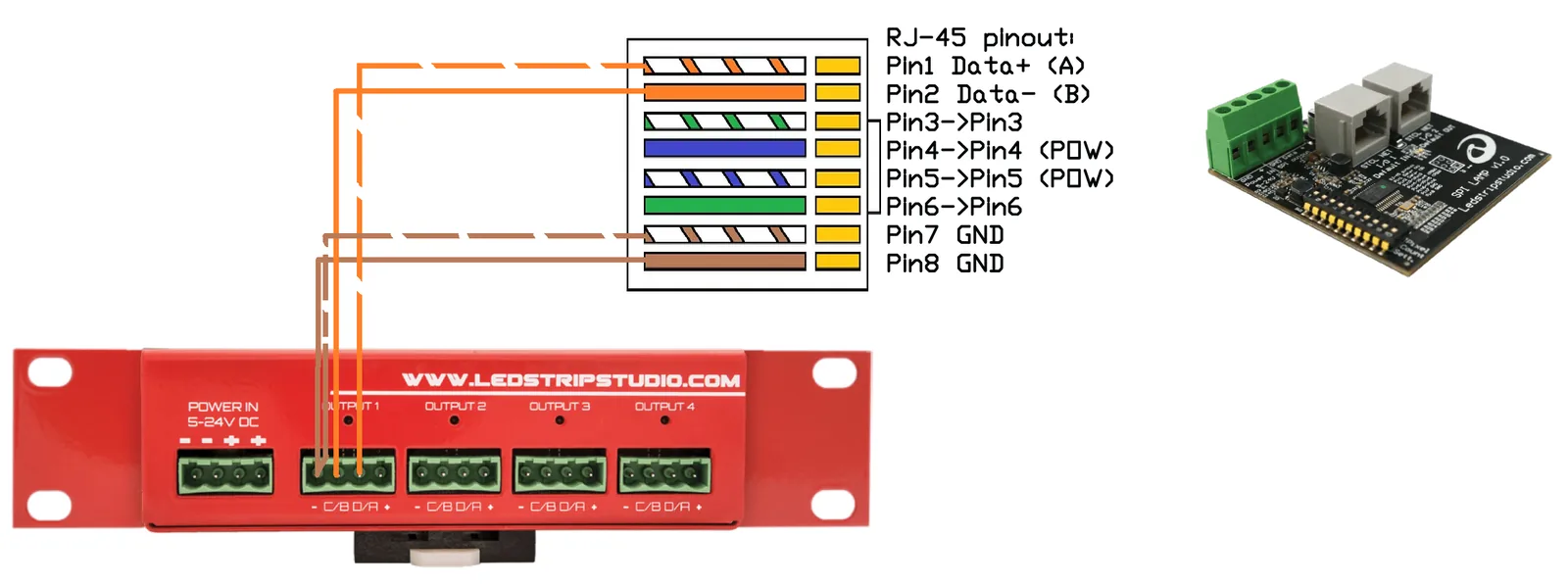 Source: LED Strip Studio
The pinout above is the one used on every run in this installation: data on pins 1 and 2, ground on pins 7 and 8. Wiring it the same way on every ring keeps commissioning predictable when a fixture has to be swapped years later.
Case Study: How Was the Numismatic Showroom Lit?
Macho & Chlapovic is an established company covering appraisal, minting expertise, a showroom and an auction centre. Their collection spans everything from pre-antique pieces to modern rarities known to numismatists and philatelists.
The client had just redecorated the showroom and wanted to lift its street presence along with the rest of the premises. The lighting had to match the weight of the institution and stay playful at the same time. That is a narrower target than it sounds.
Programming in LED Strip Studio pixel mapping software was deliberately restrained. Transitions between animations were kept subtle, so the facade reads as ambience rather than as a display. The same restraint guides galleries, museums and cinemas, as explained in our guide to pixel LED lighting for public spaces. Further builds of this kind sit in our project portfolio.
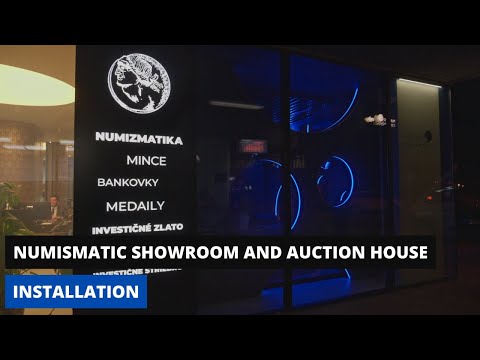
The client now has direct 24/7 access to the pre-programmed scenes from the LSS Remote mobile app. Changing the facade for a season, an auction day or a private viewing takes seconds and needs no integrator on site.
Why Does the In-House Network Matter?
An existing, robust in-house network was key to delivering control that is genuinely user friendly. The app talks to the controller over that network, so its coverage and stability decide whether the system feels instant or unreliable.
Plan the network in the same conversation as the fixtures, not after the plaster is closed. Retrofitting a cable run into a finished facade is far more expensive than pulling one extra line during construction.
How Do You Map Each Coin as a Separate Digital Strip?
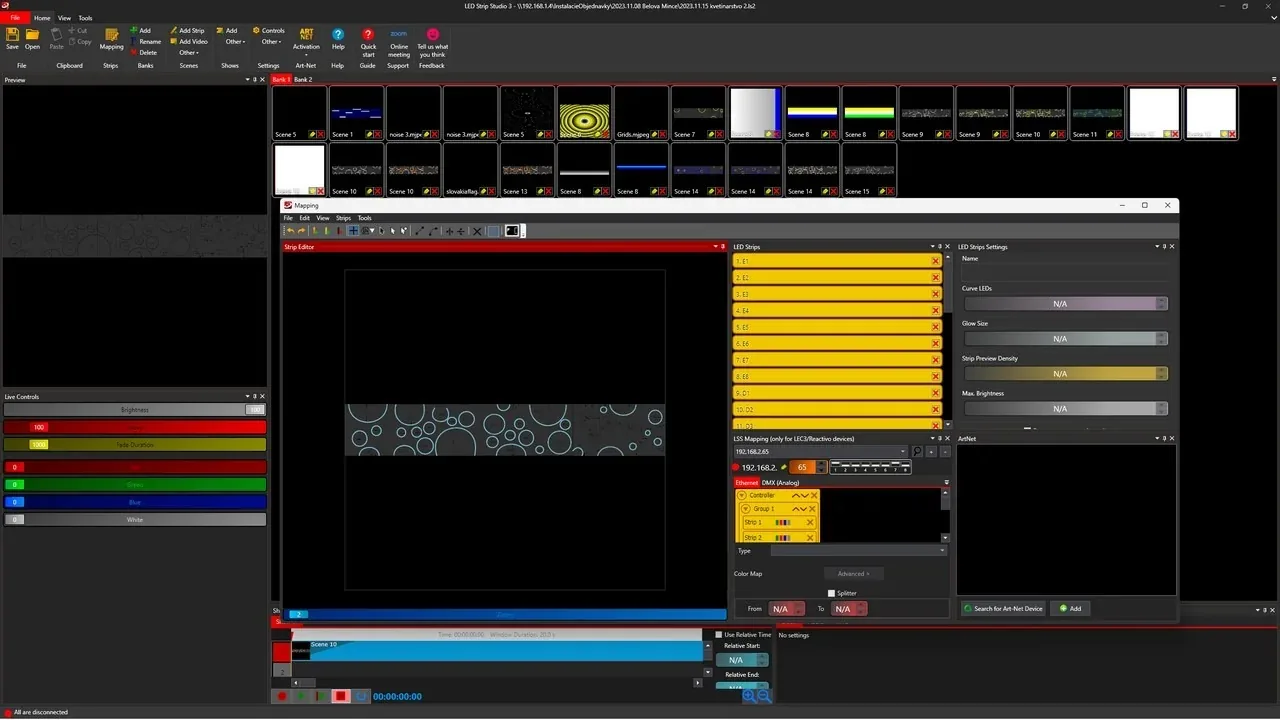
In the software, each coin is defined as its own Digital strip, not as a segment inside a shared one. That single decision determines what the installation can do for the rest of its life.
A Digital strip is the unit the controller treats as one addressable line. A segment is only a part of such a line, so segments inside one strip share whatever effect is assigned to that strip.
What Does a Group Do in the Controller?
A Group lets several Digital strips share a single physical output, with outputs 1 to 4 mapped to groups 1 to 4. The coins therefore stay separate objects in software while still being wired economically in hardware.
The payoff appears in Strip effect scenes. Each coin is a Digital strip inside a Group, so an effect can be assigned to individual coins. Without that structure, one effect would run identically across everything connected to a single output. Step-by-step guidance is in our knowledge database.
Segments or Separate Digital Strips: Which Should You Use?
| Criterion | Segments in one Digital strip | Separate Digital strips in a Group |
|---|---|---|
| Effect assignment | One effect across the whole strip | Different effect per object |
| Object identity in software | Part of a longer line | Named, independent object |
| Outputs consumed | One | One, via a Group |
| Reordering objects later | Requires remapping the strip | Change the Group membership |
| Setup effort | Lower | Higher, done once |
| Suitable for | Continuous runs, coves, edges | Repeated discrete objects, such as coins |
The extra setup effort is paid once, during commissioning. The flexibility it buys is used every time the client asks for a new look.
 Source: LED Strip Studio
Which Mistakes Ruin Showroom Pixel Lighting?
The failures we are asked to fix in retail and representative premises repeat with striking consistency.
- Programming a nightclub in a showroom. Fast, saturated effects undercut the credibility of a premium brand.
- Building everything as one Digital strip. Individual objects can then never carry individual effects.
- Deciding controller positions after the interior is finished. Signal distribution should be planned while cable routes are still open.
- Treating the network as somebody else’s problem. Remote control is only as reliable as the Wi-Fi behind it.
- Handing over without training. A client who cannot recall a scene will keep one look forever.
Planning a showroom or a representative interior? Book a free consultation with our team.
Summary
A showroom rarely needs more light — it needs light that makes people stop walking. This case study covers a pixel LED installation for an appraisal house and numismatic auction centre: WS2815 strips at 60 pixels per metre running at 12 V inside coin-shaped facade openings, SPI Lamps distributing signal to each ring over standard CAT6 because no controller could sit near the fixtures, and every coin mapped as its own Digital strip inside a Group so individual effects can run per object on a single output. Animations were kept deliberately restrained, and the client now recalls scenes 24/7 from the LSS Remote app.