Technology
What Do LITE, STANDARD and PRO Mean on LEC3 and SPI Matrix?
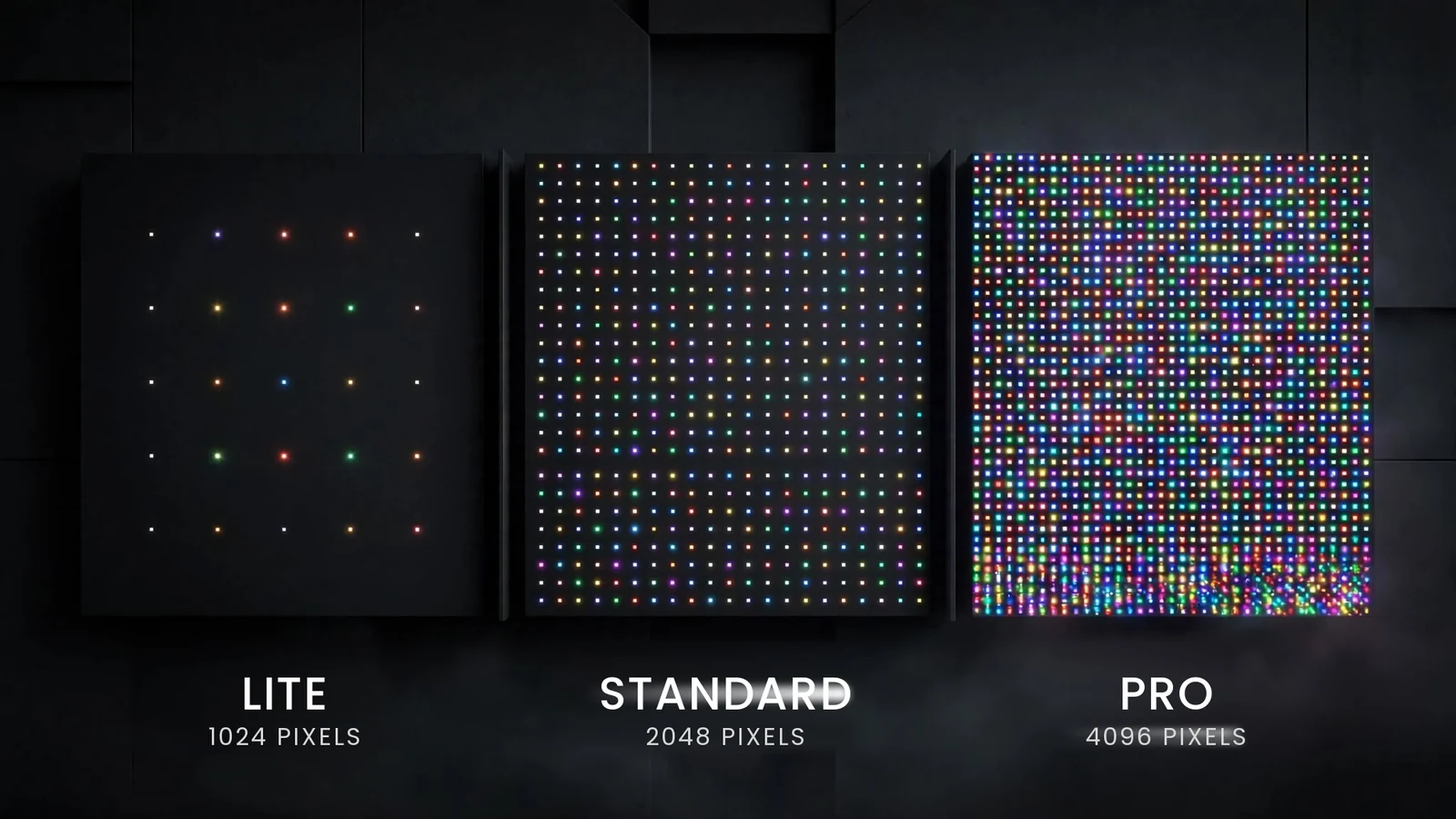
Two of our controllers, the LEC3 and the SPI Matrix, are sold as LITE, STANDARD or PRO. The three names suggest three different devices. They are not. The board inside is identical, and so is everything you can plug into it. What the tier changes is a single number: how many pixels the device is licensed to drive.
This article explains what that number means, why it comes with a matching count of Art-Net universes, how to pick a tier, and what happens when the installation outgrows it.
- LITE drives 1024 RGB pixels or 6 Art-Net universes, STANDARD 2048 pixels or 12 universes, PRO 4096 pixels or 24 universes.
- Hardware, outputs, SD card playback, DMX and web configuration are the same on every tier.
- One output never carries more than 1024 RGB or 768 RGBW pixels, on any tier. The tier is the total across four outputs.
- A pixel upgrade moves an existing device to a higher tier without replacing it.
What Do LITE, STANDARD and PRO Actually Change?
Each tier is a pixel budget. The controller counts the pixels assigned to its outputs in the mapping and refuses to drive more than the budget allows. Because Art-Net carries pixel data in universes of 512 channels, every budget has an equivalent in universes, and that is the second number you see on the product pages.
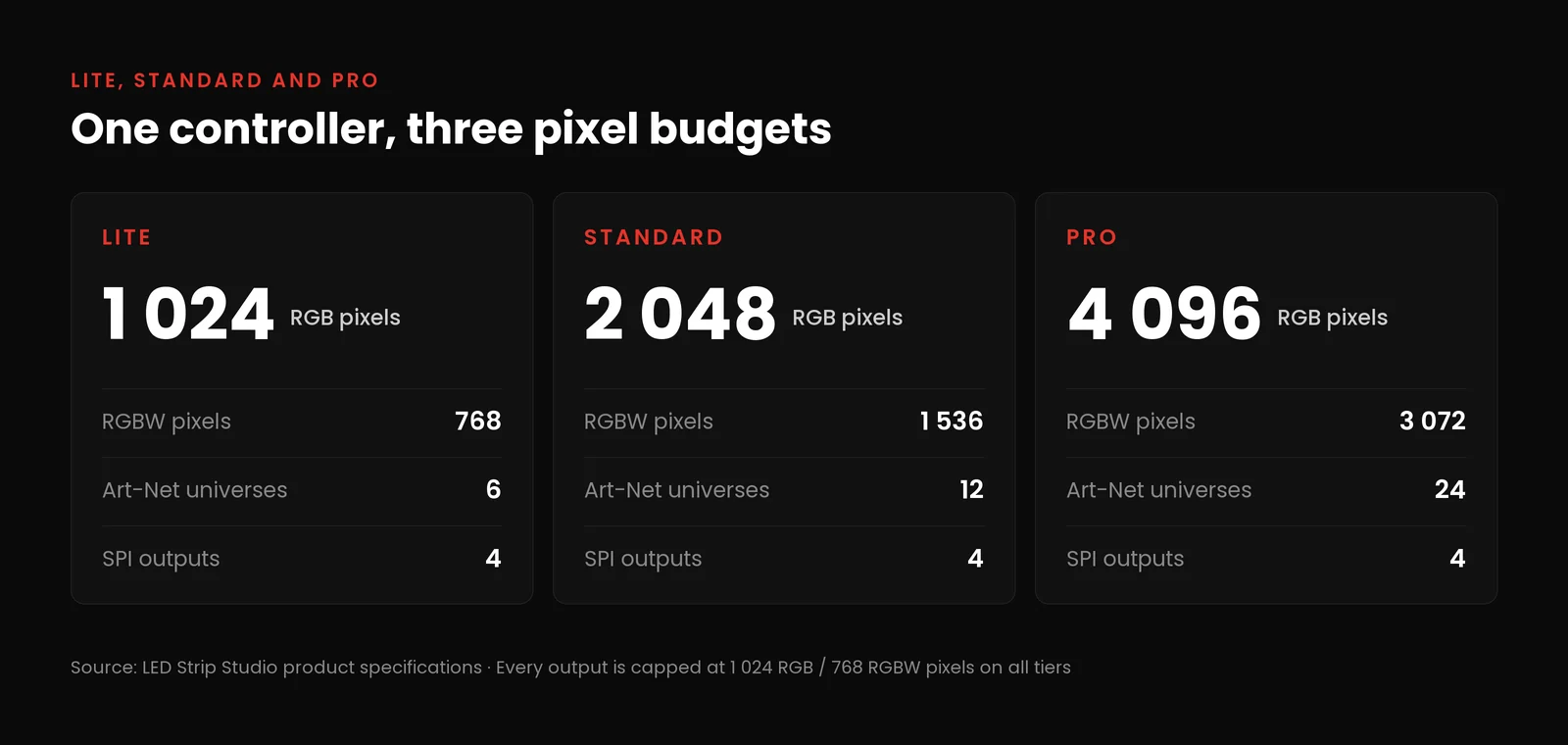 One controller, three pixel budgets. Source: LED Strip Studio
The same three tiers exist on the LEC3 Demo Kit, because the kit is built around a LEC3. The strips, power supply and cables in the box are identical across all three kits; only the controller’s pixel budget differs.
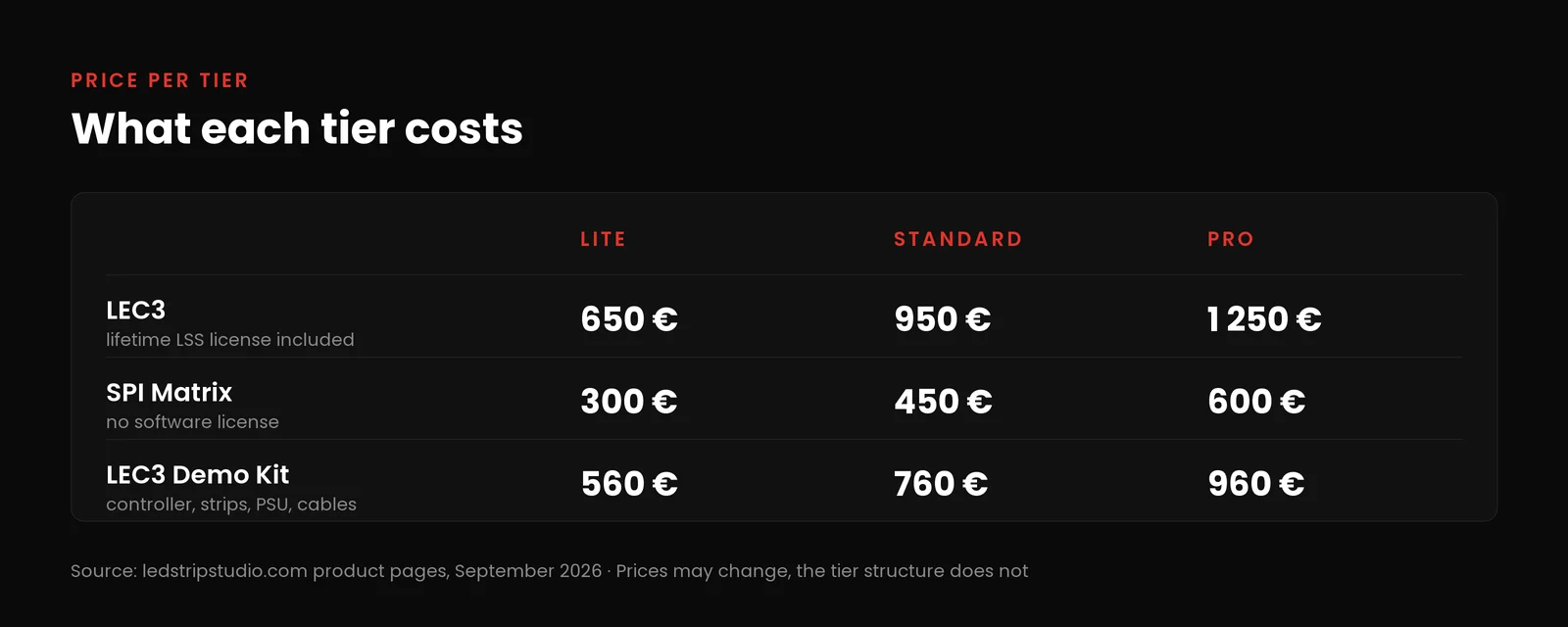 Tier prices on the product pages in September 2026. Source: LED Strip Studio
Why 6, 12 and 24 Universes?
The universe counts fall out of the arithmetic. An Art-Net universe holds 512 DMX channels. An RGB pixel uses 3 channels, so one universe holds 170 RGB pixels, with 2 channels left over. An RGBW pixel uses 4 channels, so one universe holds exactly 128 of them.
One full output of 1024 RGB pixels needs 3,072 channels, which is 6 universes. 768 RGBW pixels need the same 3,072 channels. That is why one output equals 6 universes, and why a device with four full outputs is a PRO at 24. If you want to run the numbers for your own installation, our Art-Net universe calculator does it in one step. The protocol itself is documented by its maintainer, Artistic Licence.
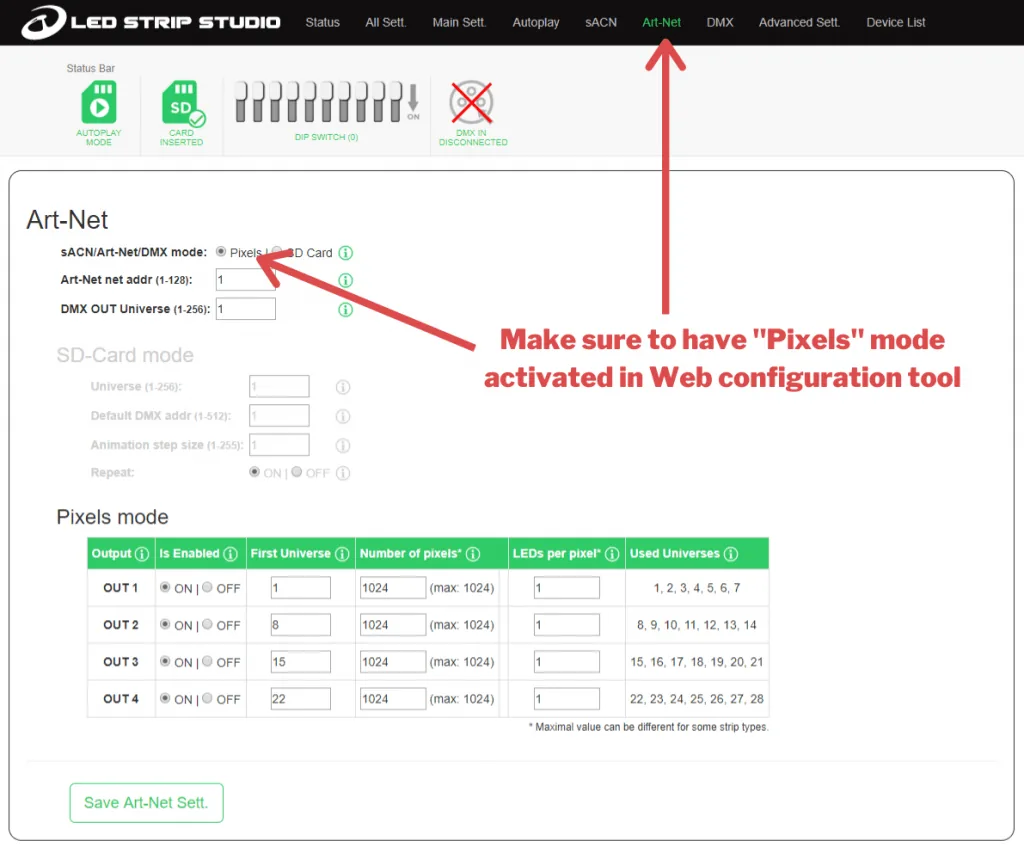 The Art-Net settings of a LEC3 in its web configuration. Source: LED Strip Studio
What Stays the Same on Every Tier?
Everything you can touch. All three tiers have the same four SPI outputs, the same SD card slot for standalone playback, the same DMX in and out, the same Ethernet port and the same web configuration reachable from any browser or phone. They support the same LED chip types and the same control options: Art-Net, sACN, DMX512, standalone from SD card, or live from LED Strip Studio.
The software license follows the product, not the tier. Every LEC3 includes a lifetime LED Strip Studio license, LITE included. No SPI Matrix includes one, PRO included. That is the real difference between the two controllers, and the tier has nothing to do with it.
How Do You Pick the Right Tier?
Start from the pixel count of the installation, not from the price list. Count every pixel you will connect, and remember that a strip labelled 60 LEDs per meter has 60 pixels per meter only when every LED has its own chip. On most 12 V strips one chip drives three LEDs, so the same strip is 20 pixels per meter. The chip datasheet tells you which.
How Many Pixels Does the Installation Have?
With the total in hand, the tier is the smallest budget that covers it. 900 RGB pixels fit in LITE. 1,500 need STANDARD. 3,000 need PRO. For RGBW, use the RGBW column of the table, since each pixel costs a fourth channel.
There is a second check that people skip. Every output carries at most 1024 RGB or 768 RGBW pixels, whatever the tier. A STANDARD unit with 2048 pixels therefore needs at least two outputs in use, and a PRO with 4096 needs all four. The tier sets the total; the outputs set how you split it. A single 1,500-pixel run on one cable does not work on any tier; it has to be broken into at least two runs.
One Big Controller or Several Small Ones?
Above 4096 pixels you need more than one device, and the same question comes up below that number when the pixels are far apart. A PRO at one end of a 60-meter room still has to get a signal to the other end, while two LITE units placed near their strips keep the SPI cable runs short. The CNN Prima NEWS studio runs about 84,000 pixels on 25 LEC3 PRO units, roughly 3,400 pixels each, because the set is dense and the controllers sit close to the strips. The Bad Ischl congress hall puts 38,000 pixels on 20 SPI Matrix units, about 1,900 each, which is a STANDARD budget with room to spare.
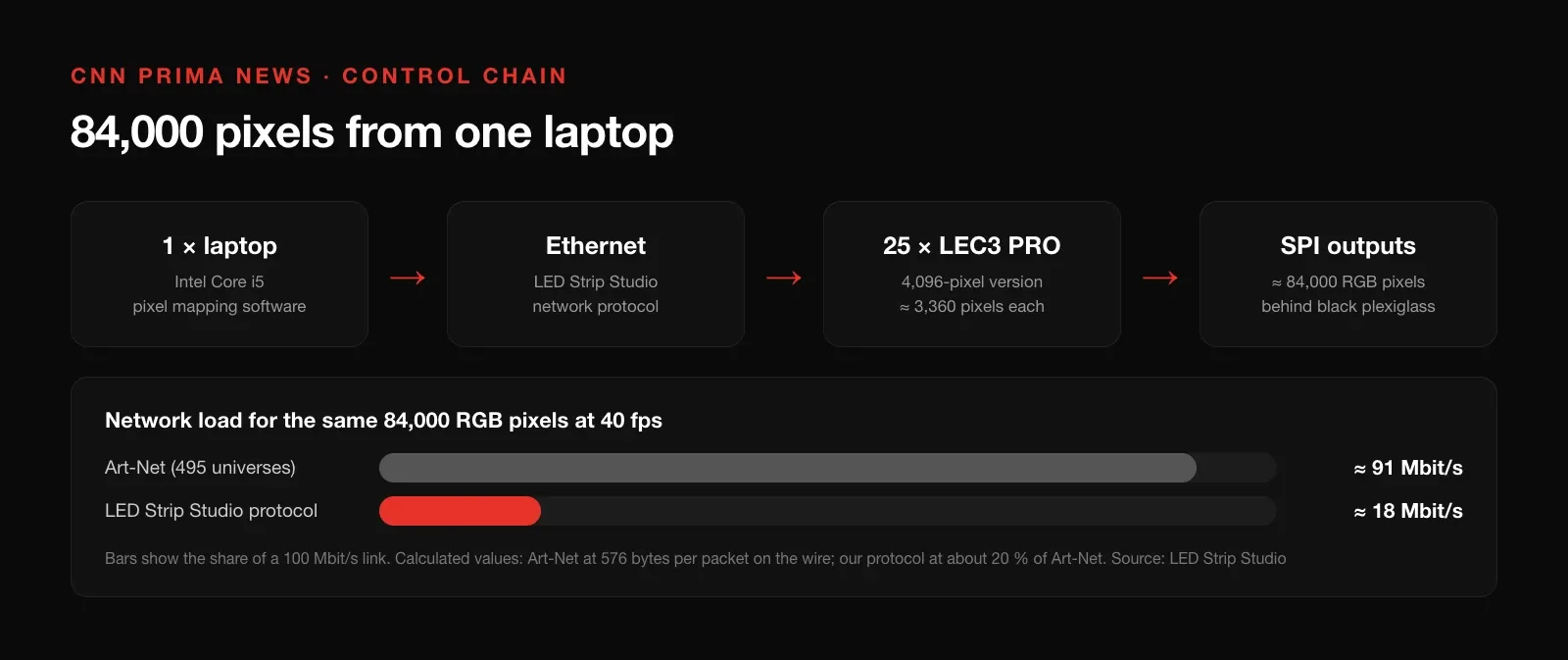 25 LEC3 PRO units driving one TV studio from a single laptop. Source: LED Strip Studio
How Much Headroom Should You Leave?
Installations grow; they almost never shrink. A pixel count within a few percent of a tier’s ceiling is a sign to take the next tier, or to plan the upgrade described below. If you already know a second phase is coming, buy that budget now.
Can You Upgrade From LITE to PRO Later?
Yes, and without opening the enclosure. A pixel upgrade is a small configuration file that raises the pixel budget of one specific device. It is bound to the device’s serial number, so it cannot be copied to another unit. Three upgrades exist: 1024 to 2048, 2048 to 4096, and 1024 to 4096.
The serial number is in three places: on the sticker on the back of the device, on the sticker on its box, and in the Status tab of the web configuration. The box sticker also shows the pixel version, which is the quickest way to check what tier a unit in storage is.
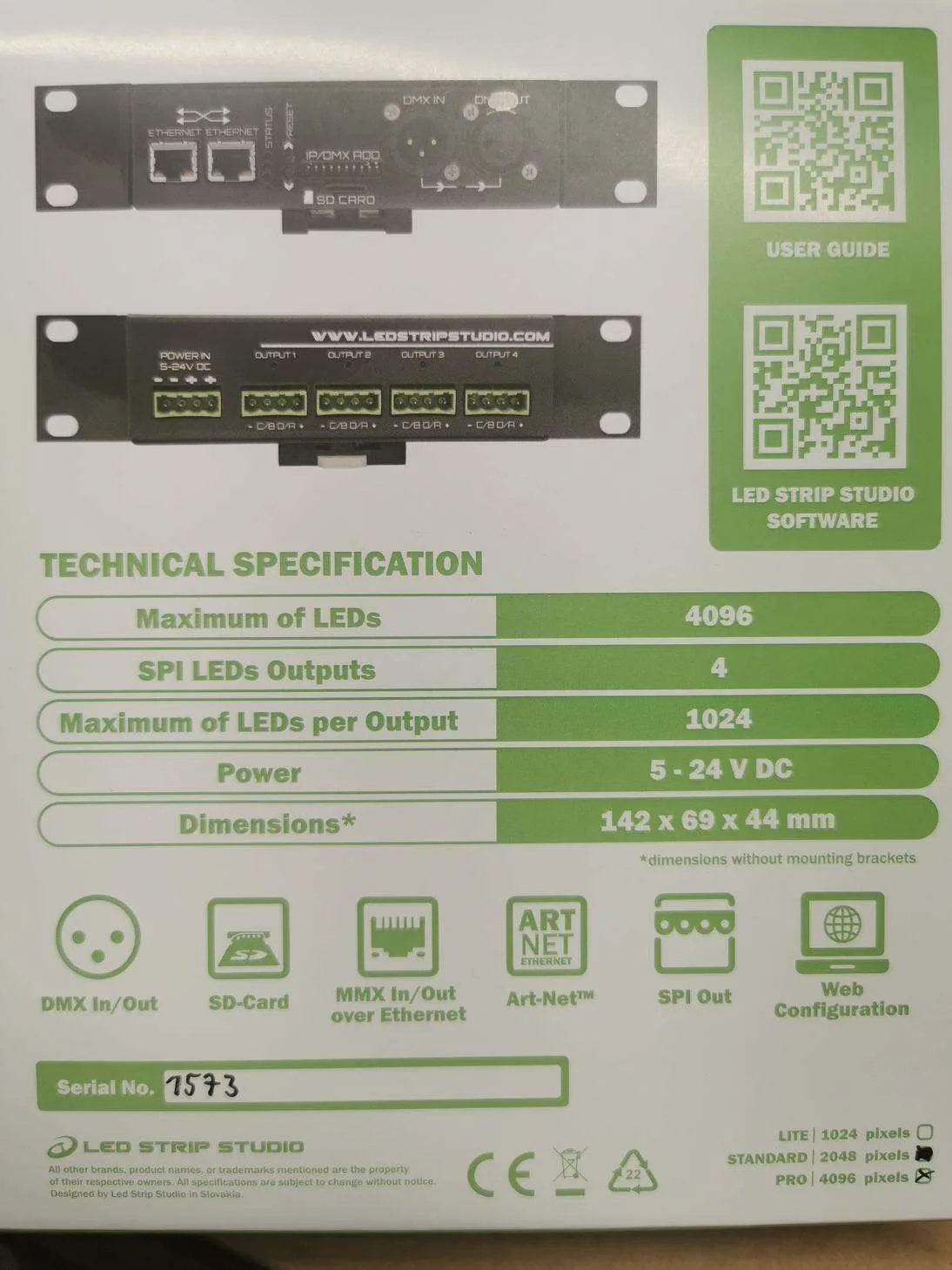 Pixel version and serial number on the box. Source: LED Strip Studio
After the purchase, the upgrade file is uploaded in the web configuration under Advanced settings, in the Upload files section, using the LED Count setter. A confirmation message reports the new pixel count immediately. The pixel upgrade guide walks through it screen by screen.
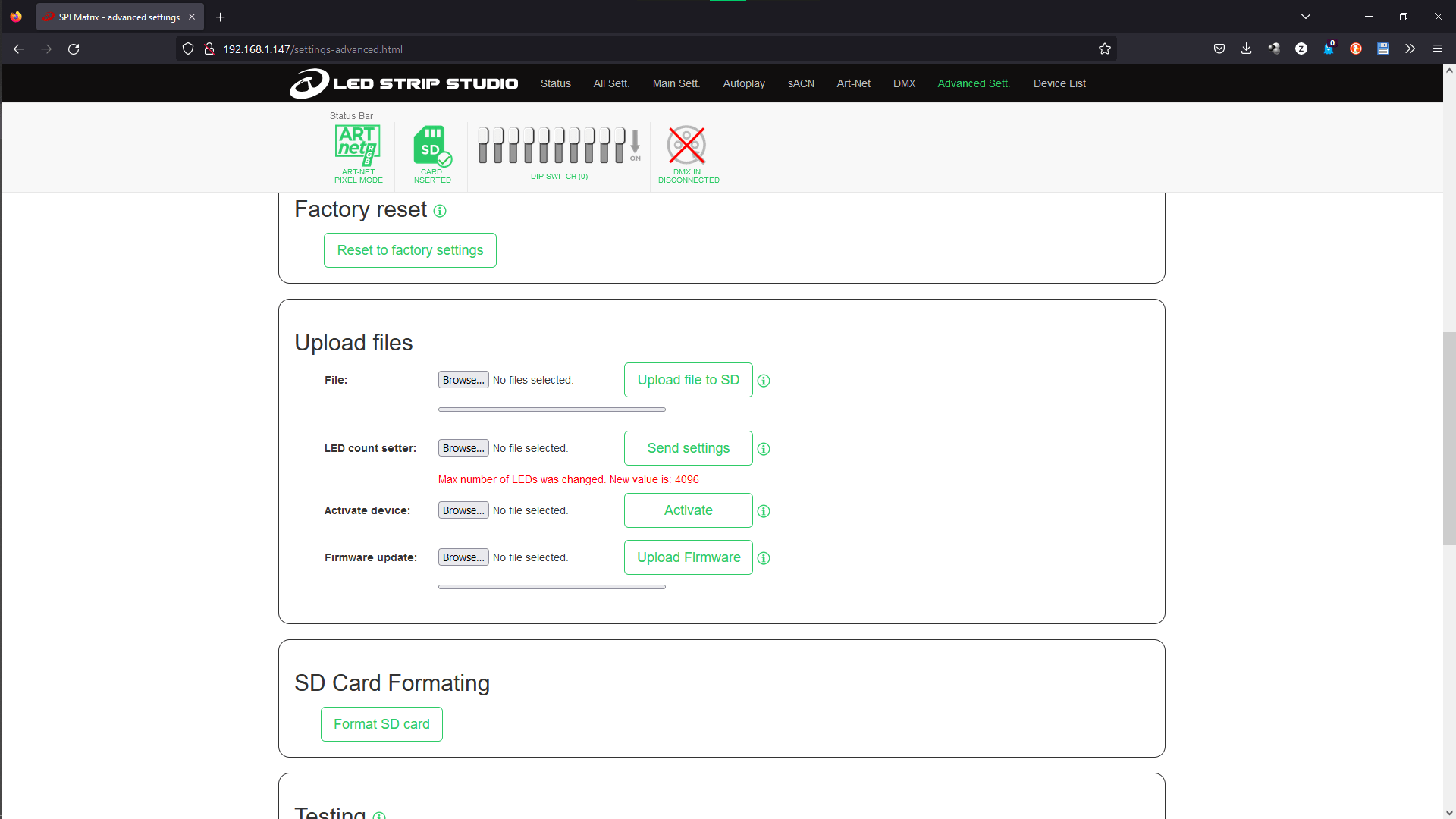 The web configuration confirms the new pixel count. Source: LED Strip Studio
Which Controllers Come in Tiers?
Only the two four-output controllers and the kit built around one of them.
- LEC3 — LITE, STANDARD, PRO. Lifetime LED Strip Studio license on all three.
- SPI Matrix — LITE, STANDARD, PRO. No software license on any tier.
- LEC3 Demo Kit — LITE, STANDARD, PRO, following the LEC3 inside it.
Our other controllers have a fixed budget and no tiers: Reactivo 2, the Powered SPI LED Controller 2 and the SPI LED Controller each drive up to 1024 RGB or 768 RGBW pixels from one output, the same as one output of a LEC3. Below 1024 pixels, Wi-Fi, a built-in power supply or DIN-rail mounting may matter more than a tier; above one output, the tiered controllers are the only option.
Which Mistakes Do People Make When Choosing a Tier?
Most tier problems are counting problems, and they show up on installation day.
- Counting LEDs instead of pixels. On 12 V strips three LEDs share one pixel, so a 300-LED strip may be only 100 pixels. Check the chip before you count.
- Forgetting the per-output cap. 1,500 pixels on one cable will not run on a PRO either; split the run across outputs.
- Buying LITE at 1,000 pixels. The strip added next season has nowhere to go; put STANDARD or an upgrade in the quote.
- Mixing up the tier with the license. A PRO SPI Matrix still has no LED Strip Studio license; a LITE LEC3 does.
- Choosing a single PRO for pixels spread across a large space. Two smaller units near the strips often mean shorter SPI runs and fewer signal problems.
- Losing the serial number. The upgrade is bound to it, so note it from the box sticker when the device is installed, not when the ceiling is closed.
Not sure which tier your installation needs? Book a free consultation and we will size the controllers with you.
Summary
LITE, STANDARD and PRO are not three controllers but one controller with three pixel budgets: 1024, 2048 or 4096 RGB pixels, which is 6, 12 or 24 Art-Net universes. The board, the four SPI outputs, the SD card playback, the DMX ports and the web configuration are identical on every tier, and on LEC3 the lifetime software license is included on all three. Pick the tier from your pixel count with some headroom, remembering that one output never carries more than 1024 RGB pixels whatever the tier. If the installation grows, a pixel upgrade bound to the device's serial number moves it to a higher tier without touching the hardware.