What is Demo kit and how to use it?
This product suits all customers who want to try LED technology. The Demo kit enables easy beginning with the LSS system.
Package Contents
- LED Ethernet Controller 3
- 150W 5-24V power supply connected to controller (depending on the supplied LED strip)
- 2 x 5 meters of testing LED stripes with SPI connectors
- LED Strip Studio software installation Pro version
- Testing and settings interface accessible from your web browser
- Prearranged workspace with effects and show for quick testing
- Entire documentation and lots of available tutorials
- SD card with effects and LSS Software
- 1m long Ethernet cable
- Plug and Play – everything is ready to use immediately
The first installation and working with LSS Demokit 3
Complete video tutorial for LSS Hardware and Software setting is available on the page.
Step-By-Step Hardware Installation
- Plug in LED strips into SPI outputs
- Plug in to power source (110-240 V), 5V on output
- Put SD card into dedicated slot on front panel of controller
- Use buttons to switch pre-loaded effects
- LED stripes start to play effects. If not, something is wrong. Please check again the instructions or contact support.
Step-By-Step Software Installation
- Install LED Strip Studio software from the web page
- After successful installation, go to system settings of your PC. There is a complete manual in the video above. Connect Demo kit with Computer by Ethernet Cable
- Launch LED Strip Studio software, which should detect connected Demo kit
- Click on prearranged effects, which will be played on LED strips connected to your LEC 3 device
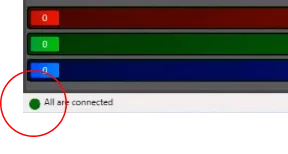
Green marking in the left down corner of LED Strip Studio indicates successful connection.
What to do if it all goes well?
- Enjoy! Play and try every imaginable trick on your new device
- Check out available tutorials
- Don’t hesitate to ask for advice or help
- Recommend to your friends and clients
What to do if something goes wrong?
- Keep calm and check the step-by-step manual one more time
- If unsuccessful, contact support via phone or email
- Book a consultation for additional assistance
Images
Videos
