Pixel mode enables control of individual LEDs or pixel groups using standard DMX signals. It emulates analog output functionality on digital SPI controllers, making it ideal for versatile lighting setups.
What output can I use for Pixel mode?
“With DMX Pixel mode, you can emulate Analog like output on your SPI digital outputs.” You can control the first pixel on the first digital output, with the capability to emulate this across all 4 outputs. For instance, configuring 4 pixels on separate outputs requires setting the Number of pixels to 4 and LEDs per pixel to 1024, where channels 1-3 control the first output, channels 4-6 control the second output, and so forth.
DMX settings in web configuration
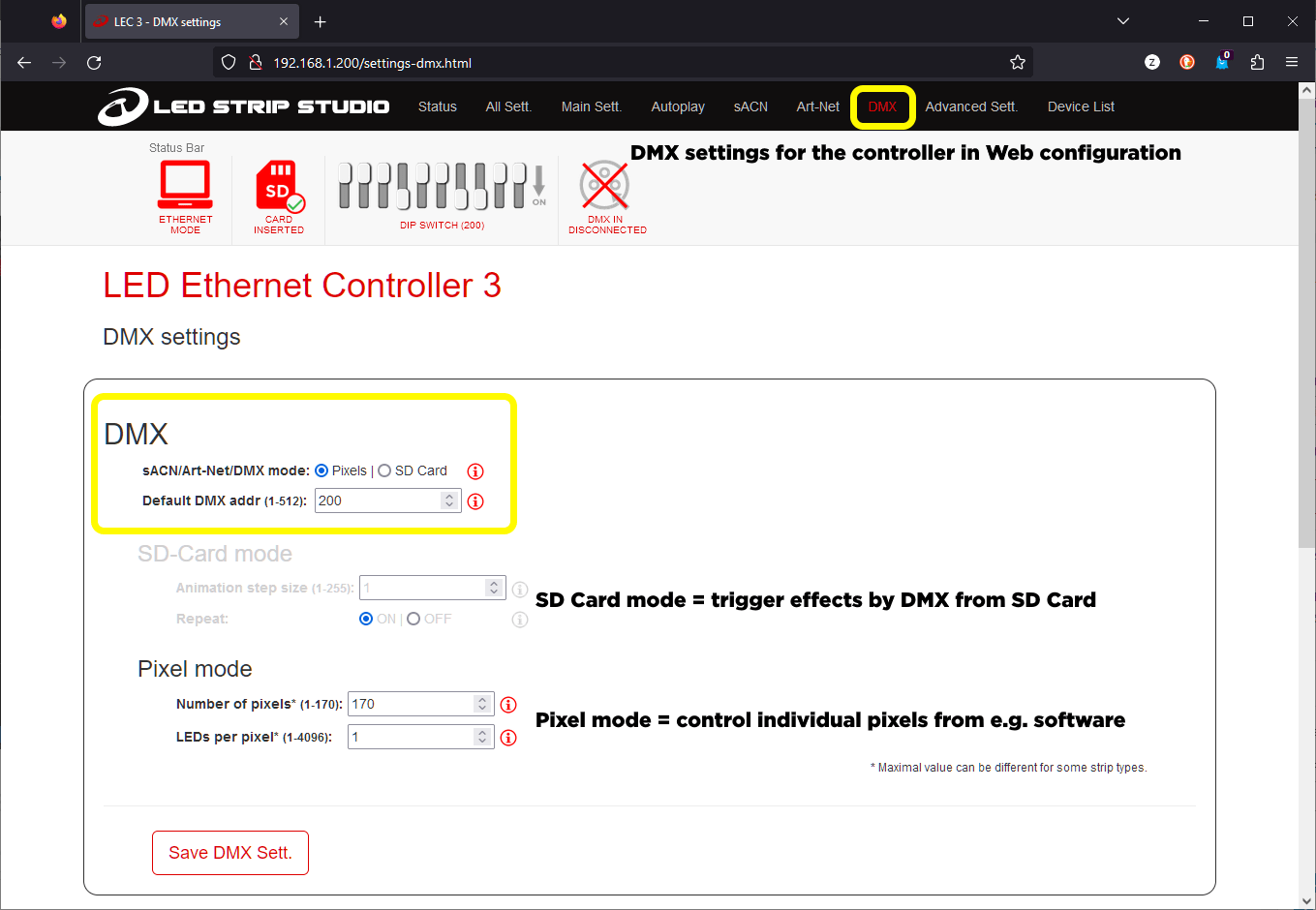
Number of pixels
You can set the desired quantity of pixels to control. Each pixel requires 3 channels for RGB strips or 4 channels for RGBW strips.
Pixel group – LEDs per pixel
The LEDs per pixel setting determines how many individual LEDs function as a single pixel unit. This allows controlling multiple pixels as one entity using only 3-4 channels, depending on strip type configuration.
Who might benefit from this feature?
Users seeking to employ a single device that emulates analog strips on digital outputs benefit most. This proves particularly valuable for rental applications, offering one device capable of performing multiple tasks.
Images

Videos
